

Almost every Counter Strike player has asked themselves at some point what values such as the Finish Catalog or the Finish Style mean. In this article, we will therefore explain exactly what the individual attributes of the skins mean, what they say about the skin and what they are important for.
What attributes do we mean exactly?
If you look at a skin in Counter Strike, you can hover over the "I" with the mouse pointer, as you can see in the following picture, and some values will be displayed. We will explain everything you need to know about these values.
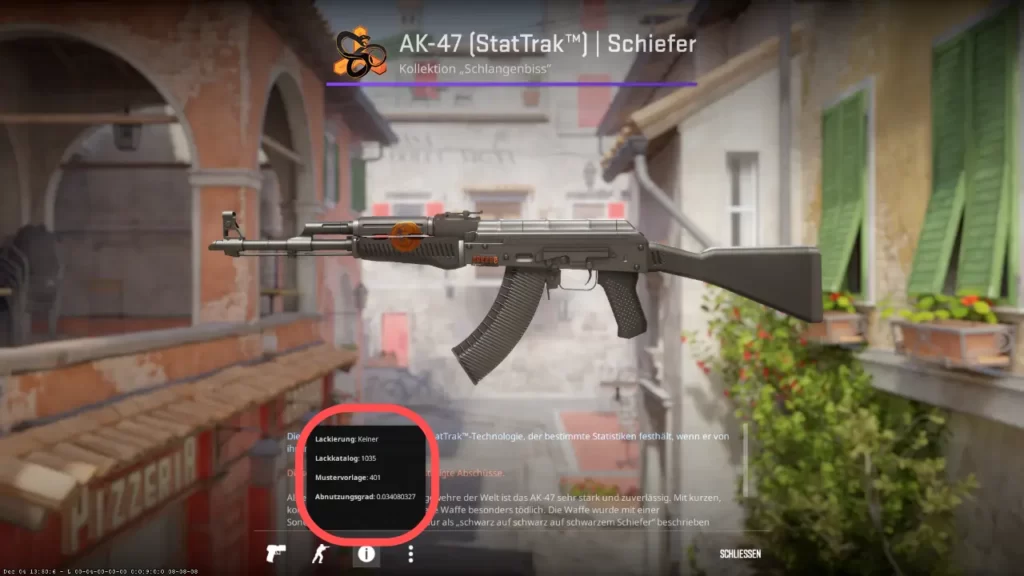
Finish Style (lacquering)
Let's start with the top attribute: Finish Style, or the paint job in German. The finish style is actually very irrelevant for you as a player or trader.
The Finish Style is important if you want to create skins yourself. In Counter Strike it is possible for anyone to create skins and upload them to the workshop. Many of the skins available in Counter Strike were actually created by players themselves.
When creating skins, you can choose between nine different finish styles (paint jobs). These nine different styles come from the real world and reflect a real technique that can be used for painting.
But what influences the finish style in Counter Strike?
In the game, the finish style influences how the skin looks worn, i.e. with some finish styles the skin gets scratches with poorer condition, while with other finish styles the color becomes paler with poorer condition, for example.

If you want to find out more about the different finish styles, you can here, in the Counter Strike Workshop to find out more.
Finish Catalog (paint catalog)
The next attribute is the finish catalog or paint catalog. The finish catalog can be seen as the ID of the skin.
An example for easier explanation, then you will understand exactly what the Finish Catalog means:
As you may know, there are skins available for various weapons, such as the Case Hardened Skin. All Case Hardened skins have the Finish Catalog 44, regardless of whether you are looking at an AK-47 Case Hardened or a Bowie Knife Case Hardened.
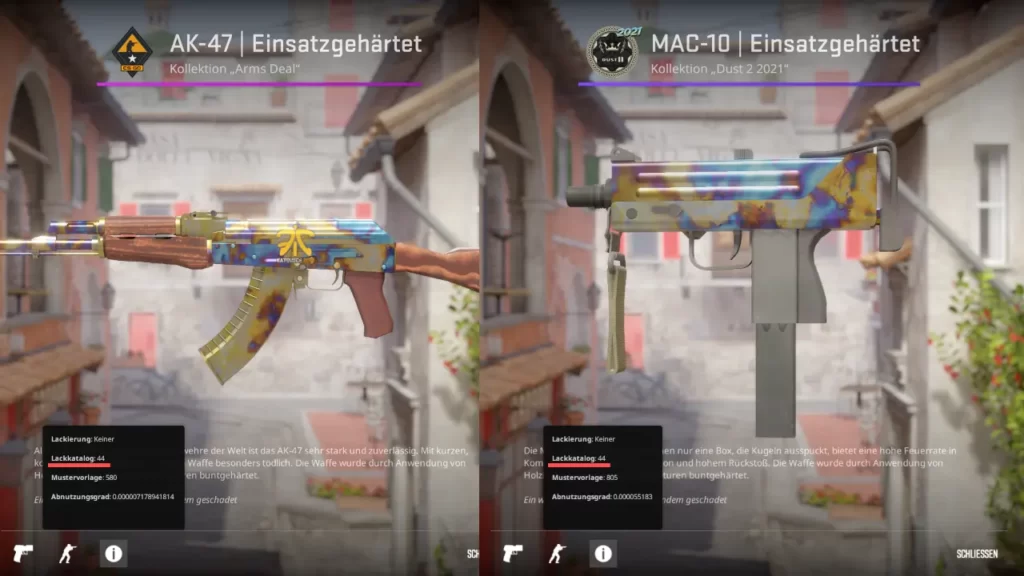
As with every rule, the Finish Catalog also has some exceptions. Some skins have the same name, but still have different Finish Catalog IDs on different weapons.
However, you can always be sure that a skin on the same weapon will always have the same Finish Catalog. It is not possible to have the same weapon with the same skin twice, but the finish catalog is different.
Pattern Template - Pattern Index (pattern template)
The pattern template or pattern index is very interesting for all skin lovers. The normal Counter Strike player has probably already come across it when looking for information about rarer skins such as Blue Gems.
The pattern template determines how the weapon is placed on the pattern texture and thus decides how the skin ultimately looks.
With a case-hardened skin, for example, the pattern index determines how much blue the skin has and where the blue is.
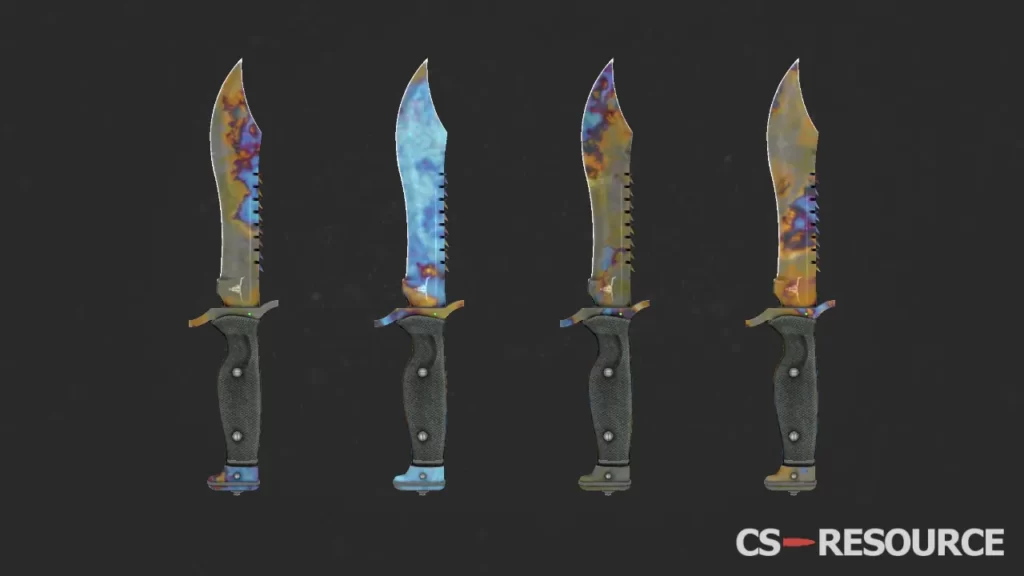
However, there are also skins where the pattern does not matter. These include, for example, the Glock-18 Candy Apple. The arrangement of the color in this skin always looks the same regardless of the pattern index.

If you want to find out more about exactly how the pattern index works, take a look at our dedicated article on the Pattern Index over.
Wear Rating - Float (degree of wear)
The last attribute is the wear rating (often referred to as float). This should be known to every Counter Strike player who is at least a little familiar with skins.
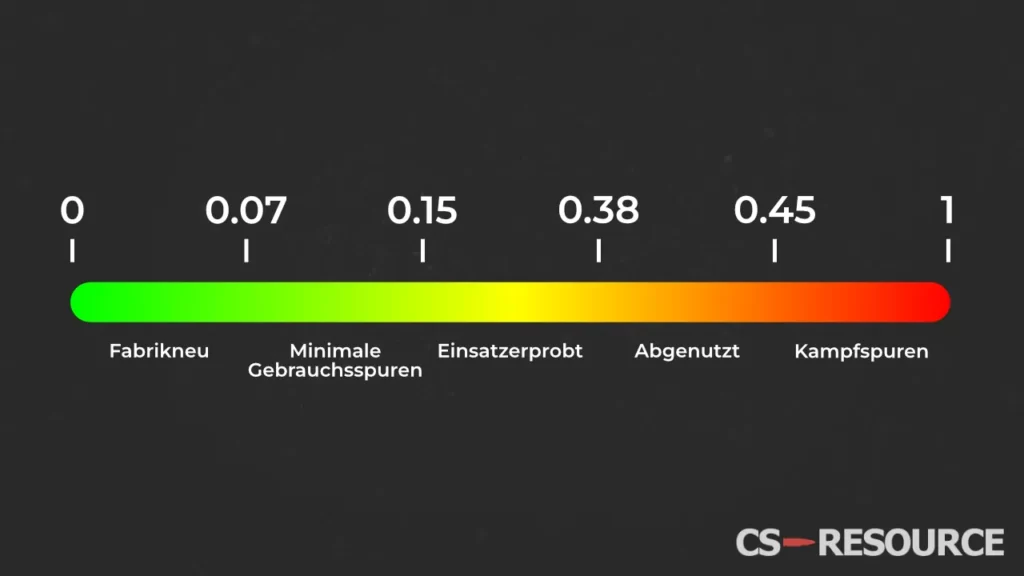
The degree of wear determines the condition of the skin, i.e. factory new to battle scars. The skin is assigned a value between 0 and 1 and depending on which value the skin receives, it is assigned to the corresponding condition.
In the following graphic you can see how the float value (degree of wear) can be translated into the 5 states of the Counter Strike skins:
To find out more about the float value, take a look at here over. There we explain in detail how the degree of wear works.
Summary - These values are important
As you may have noticed, it always depends on what you want to do to know which attributes are relevant for you.
For the normal player who occasionally buys skins, only Float and sometimes the Pattern Index are of interest.
The pattern index is often important for traders.
The Finish Catalog is particularly important to the skin creator.
This article has given you a basic understanding of all the attributes of a Counter Strike skin and you can now focus on the attributes that are relevant to you.
 English
  German
  French
  Spanish
  Russian
  Ukrainian
  Polish
  Swedish
  Turkish
  Portuguese
  Chinese