
The best crosshair is always a popular topic between CS2 players. Basically, the exact crosshair is not that important as long as a few points are taken into account when creating the crosshair. There is no one perfect crosshair for all players.
What is important with the Crosshair?
There are actually only three things you should pay attention to with your Crosshair:
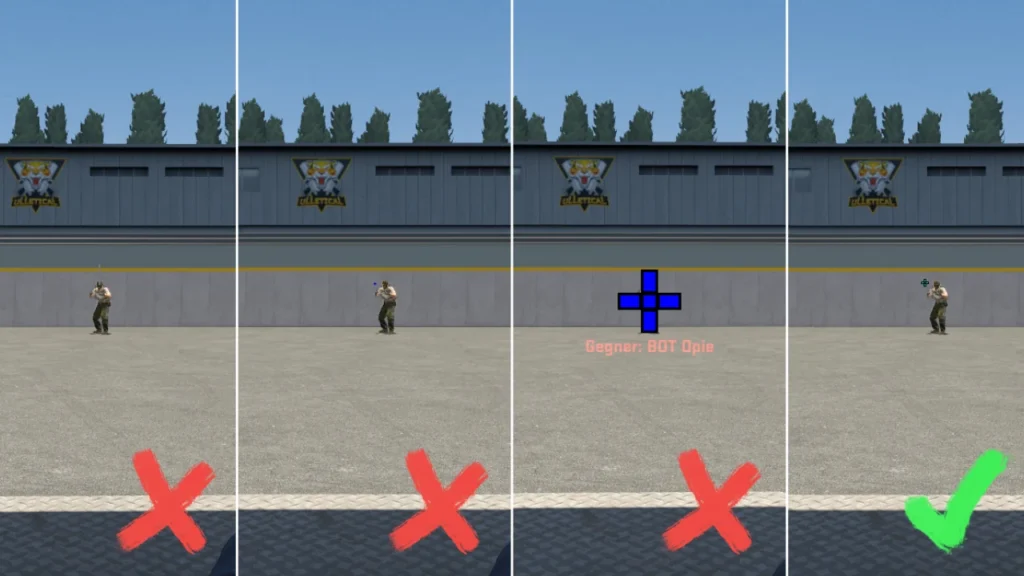
To make the crosshair stand out from the background, a highly saturated color, which is not often found on CS2 cards, is sufficient. A border can be used to make it stand out even more against the background.
The crosshair must not be too small, otherwise it will be difficult to see in hectic moments. At the same time, however, it must not be too large and possibly cover opponents.
We recommend that you set your Crosshair to the smallest size that is comfortable for you and still easily recognizable.
Which crosshairs do the professionals use in CS2?
Most professional crosshairs have two things in common: they are relatively small and have a bright, saturated color. With the combination of these two settings, you can always see the Crosshair clearly, but it is not in the way and covers too much screen area.
To give you an idea of what kind of crosshairs the pros play with, we have put together a small selection of professional crosshairs:
The Crosshair from s1mple (Crosshair Code)
With the following crosshairs s1imple played recently:
- CSGO-zqHrw-rn2Y7-n25uw-2xZUw-XrDmQ
- CSGO-yVYbF-szZxZ-2QuNz-4YHEE-jeK5O
- CSGO-sfASb-dqVCJ-oBeRQ-o42SC-2HnfO
- CSGO-uiamH-MEq4v-wwsSB-WZT2r-qeoUE
- CSGO-OCskf-qjunY-FE6T6-rsTR9-7SVvD

The Crosshair from NiKo (Crosshair Code)
NiKo has recently played with the following crosshairs:
- CSGO-Umk5s-uxPQA-eDfJW-qWMyR-znjPK
- CSGO-uM4S9-NqJmN-nhyB9-yNEk8-9khCG
- CSGO-BZh2M-Za2NT-L3ppw-u5N8U-4BsuL
- CSGO-Ccrn6-ZwQSt-qE5AC-WKU64-WsdqA

The Crosshair from ZywOo (Crosshair Code)
With which crosshairs ZywOo has played recently can be seen in the following list:
- CSGO-Qzpx5-BRLw8-xFPCS-hTns4-GHDhP
- CSGO-h3Pz6-8BasU-DKBXU-e4KEt-YPD3J

How to set up your Crosshair in CS2 (step by step)
First of all, we need to clarify what options there are for setting up your Crosshair in CS2.
On the one hand, you can use your Crosshair directly in the CS2 settings manually, but this can be very tedious. It is usually better to import a Crosshair that you like for the most part and then refine it in the settings with your own preferences.
The next way to adjust your Crosshair is to Using console commands. This was the most common method of copying and passing on crosshairs in CS:GO. However, this option has been replaced by the new crosshair codes.
The quickest and easiest way to adjust a Crosshair is to use the Crosshair Code from the desired crosshair into CS2.
Step-by-step instructions for importing a Crosshair code into CS2:
- Copy the desired crosshair code
- Navigate to your CS2 settings
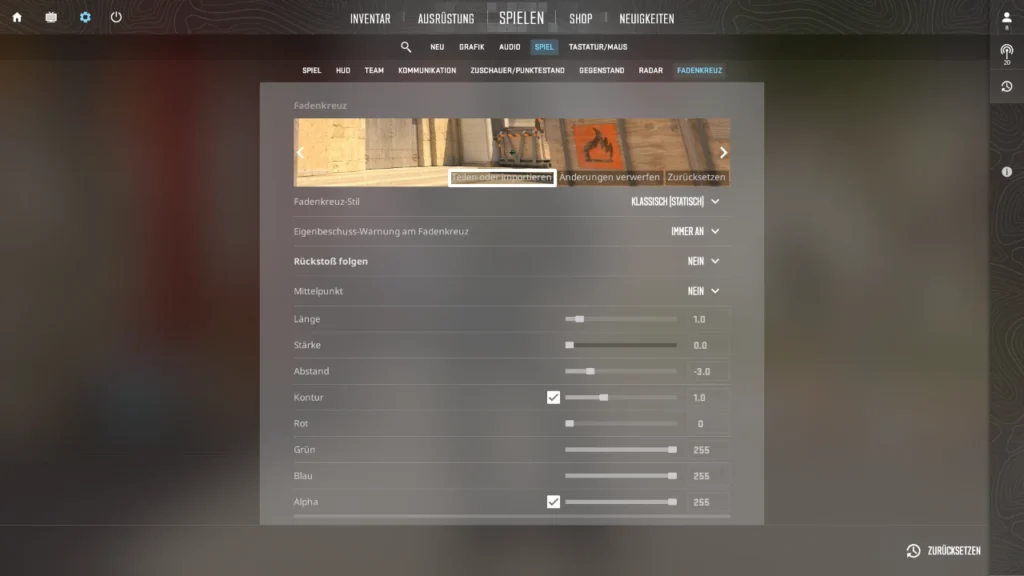
- Change to rider Game and then to the tab Crosshairs
- Click on Share or import
- Paste the copied crosshair code
- Click on Import
 English
  German
  French
  Spanish
  Russian
  Ukrainian
  Polish
  Swedish
  Turkish
  Portuguese
  Chinese